- New
Simple CMS PrestaShop module images
Simple CMS PrestaShop module
Price:
€0.00
Tax included
Turn PrestaShop’s native CMS pages and categories into a blog-style publishing experience. Simple CMS adds multilingual perexes, images, optional-prefix URLs, 301 redirects, pagination at 10 articles, breadcrumbs, related articles and sitemap integration—without duplicating CMS records or editing theme files.
Simple CMS extends the native PrestaShop CMS with a blog-style presentation. CMS pages and categories remain the original content records; articles are not copied into a separate editorial database.
Editorial fields and images
- Article image: upload and manage an image directly on a CMS page.
- Multilingual perex: write a separate short introduction for each active language with PrestaShop’s native Extra Properties system.
- Category image: add a dedicated image to each CMS category.
- Square image format: creates or reuses
simplecms_image, a 500 × 500 px square format. The uploaded original is kept and a square derivative is generated underimg/simplecms/.
Blog-style storefront
- CMS category pages show articles newest first, ordered by descending CMS ID, and paginate automatically at 10 articles per page. Cards include title, image, publication date when available, perex and a continue-reading link.
- Article pages use Simple CMS controllers and module-owned templates. They show the article image and perex, standard breadcrumbs, and the last-edited date and time below the title.
- After an article, show other active articles from the same CMS category. Choose newest first, oldest first, or articles around the current one; set the count from 1 to 50 (default: 10).
- The module records timestamps going forward. Historical dates for older CMS pages can only be shown when that information is available.
URLs, redirects and SEO
- Clean category and article URLs use localized CMS slugs. Add a configurable prefix such as
blog, or turn it off to use the shop root. Pagination adds the page number after the category path. - When routes are enabled, old native CMS category and article URLs receive permanent 301 redirects. Turning routes off restores normal PrestaShop CMS pages and stops those redirects.
- If CMS records share a slug, an ID suffix is added only to the conflicting URL. Breadcrumbs show the category and article hierarchy.
- Simple CMS adds active category and article URLs to the Google sitemap module through its standard append hook; it does not modify gsitemap. Original CMS article indexation settings are saved and disabled while routes are on, then restored when routes are disabled or the module is uninstalled. Regenerate a static sitemap after changing route settings.
Administration and compatibility
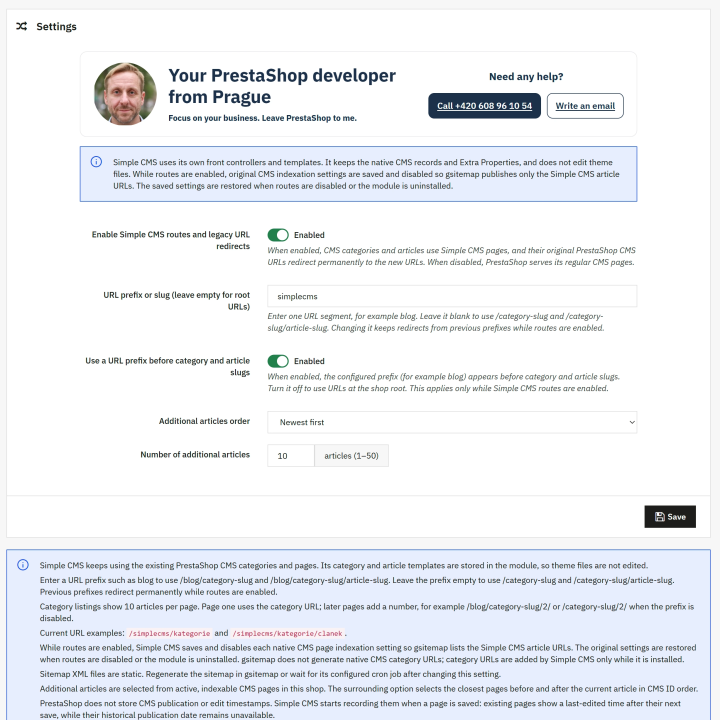
- Open settings from nalezny.cz → SimpleCMS. Configure routes, the URL prefix, related-article order and count. A PDF user-guide link is included at the bottom of the configuration page.
- If automatic routes are off, the configuration page provides Smarty examples for displaying the new image and perex fields manually in a theme.
- The module uses native CMS forms and PrestaShop 9.2 Extra Properties. It supplies its own front-office templates and does not edit theme files.
- Requires PrestaShop 9.2 or later in the 9.x series. When replacing jpblogcms, Simple CMS can migrate existing image and perex values if installed before the old module is removed.
-
ReferenceSIMPLECMS_FREE
-
In stock1000 Items
-
CompatibilityPrestaShop 9